> ## Documentation Index
> Fetch the complete documentation index at: https://docs.minimus.io/llms.txt
> Use this file to discover all available pages before exploring further.
# Supply Chain Protection
> Set up guardrails to prevent malicious package uploads based on age, download reputation and more using Minimus supply chain policies
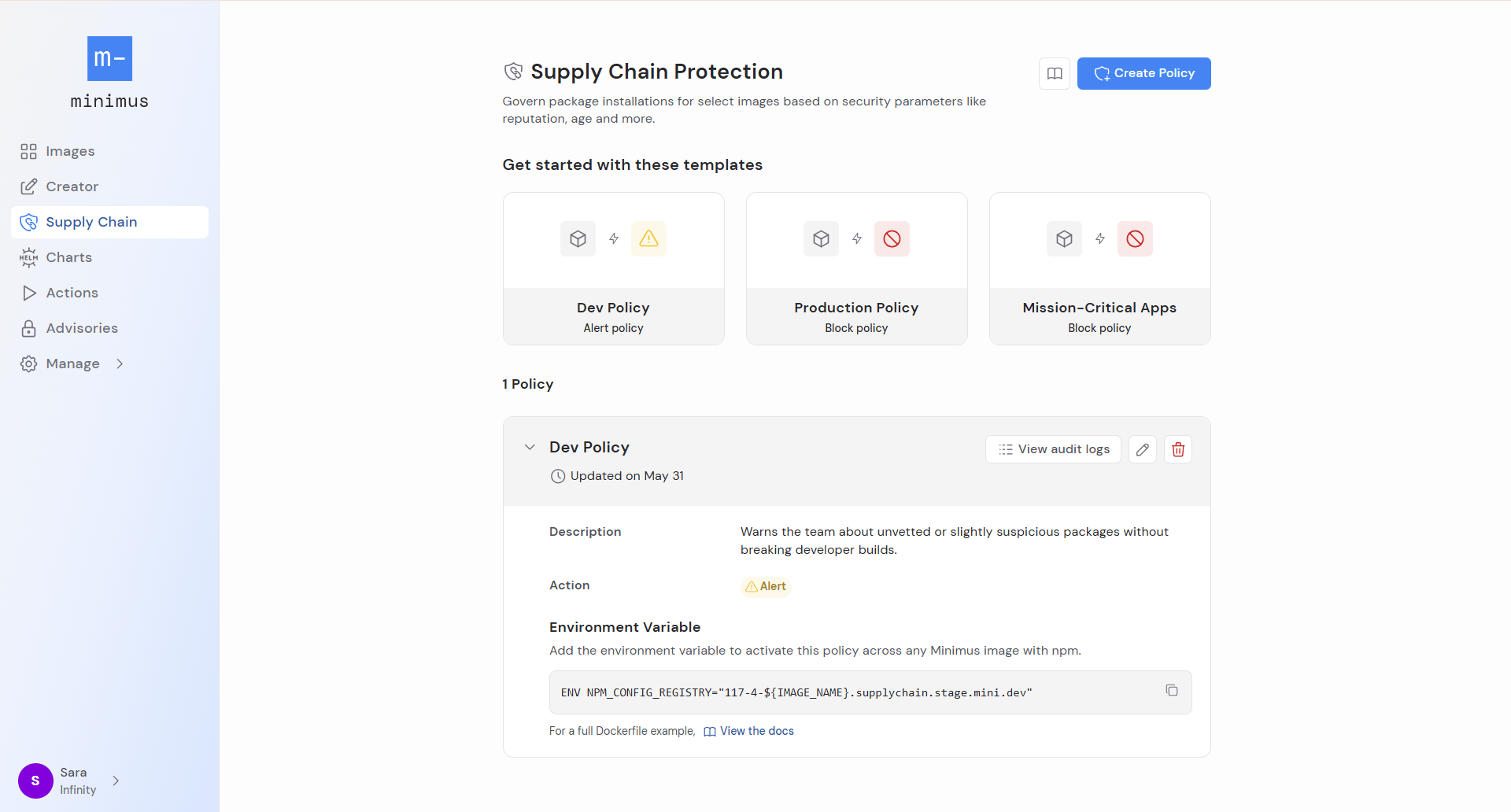
Use Minimus supply chain protection to govern package installations and enforce stronger security standards. Public repositories such as npm and pip are frequent targets for malicious package uploads and Minimus supply chain policies can help mitigate the risks with minimal setup.
 ## Create a Minimus supply chain policy
Policies are activated via an environment variable added to a Dockerfile or during runtime with any Minimus images.
It's standard practice to set up stricter policies for production and relax controls for dev environments. You can select a policy from the provided templates or create one from scratch.
Provide a name and description to identify the purpose of the policy and help your teammates understand its intended purpose.
Decide if the policy should block suspicious packages or alert on them:
* If you select block, the policy will prevent installation of packages that trigger the policy guardrails and will fail builds.
* If you select alert, the policy will generate security alerts in the Minimus Audit Log.
Set the policy's risk thresholds and trust requirements. A violation of any of these rules will activate the policy.
* **Cooling-off period** - Protects against package versions that haven't been out long enough to be vetted by the community. It sets a minimum number of days since the version's release.
* **Popularity** - Protects against package versions that haven't yet been vetted by the community. It sets a minimum number of pulls over the previous 7 days.
* **Typosquatting risk** - Toggle this setting on to enable it. It protects against packages with suspicious names, misspellings, or look-alikes of popular packages.
* **Suspicious version release** - Toggle this setting on to enable it. It protects against package versions present on a registry that lack a corresponding tag, release, or entry in the project's GitHub repository.
Add packages to the allowlist or blocklist to bypass the policy.
The policy will be added the list with its name and environment variable.
## Activate Minimus supply chain policy for npm
Once the policy is ready add the environment variable to your Dockerfile or runtime command to activate the policy and protect your supply chain. Currently the policy protects npm and should be activated for Minimus images that include npm. These may be Node-based images or private images that include npm.
Format of the environment variable: `-e NPM_CONFIG_REGISTRY="https://-${IMAGE_NAME}.supplychain.mini.dev`
Example of a Minimus supply chain policy activated in a Docker run command:
```text Run command example wrap theme={null}
docker run -e NPM_CONFIG_REGISTRY="https://157-5-${IMAGE_NAME}.supplychain.mini.dev" \
```
Example of a Minimus supply chain policy activated via a Dockerfile:
```text Dockerfile example with Minimus supply chain policy theme={null}
FROM reg.mini.dev/node
ENV NPM_CONFIG_REGISTRY="https://153-8-${IMAGE_NAME}.supplychain.mini.dev"
COPY package.json ./
RUN npm install
```
You can add the environment variable to any of your Minimus Node environments. For example, if you want to try out the [quick start example](https://images.minimus.io/images/node/quick-start) for the Minimus Node image with the supply chain policy, adjust the run command to include the policy environment variable `-e NPM_CONFIG_REGISTRY`:
```text Example of run command with supply chain policy activated theme={null}
docker run -e NPM_CONFIG_REGISTRY="https://153-8-${IMAGE_NAME}.supplychain.mini.dev" \
-p 3000:3000 -d --name minimus-node \
-v $(pwd)/hello-minimus-node.js:/home/hello_world/hello-minimus-node.js \
reg.mini.dev/node:latest \
/home/hello_world/hello-minimus-node.js
```
You can exec into your running containers to test package installs manually. The following command assumes your container name is `minimus-node`:
```text theme={null}
docker exec -it minimus-node bash
```
## Test your supply chain policy
For testing purposes, we will run`reg.mini.dev/node:latest-dev` with a Minimus supply chain policy set to alert and open a shell:
```text Test supply chain policy with node:latest-dev theme={null}
docker run -e NPM_CONFIG_REGISTRY="https://153-8-${IMAGE_NAME}.supplychain.mini.dev" \
reg.mini.dev/node:latest-dev /bin/sh
# Replace `153-8` with your policy ID
```
Inside the running container, verify npm is pointed at your policy:
```text confirm policy theme={null}
npm config get registry
```
```text expected output theme={null}
https://.supplychain.mini.dev
# example: https://1257-node.supplychain.mini.dev
```
Install a well-known, high-download package — it should pass without issue:
```bash theme={null}
npm install lodash
```
Test the **cooling-off period** guardrail by finding and installing a recently published package version:
First, check when recent versions of a package were published. (This command works best when the policy is in alert mode. In block mode, the policy will only fetch packages that aren't blocked):
```text command template theme={null}
npm view time --json | tail -5
```
```text react package example theme={null}
npm view react time --json | tail -5
```
Install a version published within your cooling-off window so it triggers the policy:
```text command template theme={null}
npm install @
```
```text block package example wrap theme={null}
bash-5.3$ npm install react@19.2.7
npm error code ETARGET
npm error notarget No matching version found for react@19.2.7.
npm error notarget In most cases you or one of your dependencies are requesting a package version that doesn't exist.
npm error A complete log of this run can be found in: /home/node/.npm/_logs/2026-06-03T12_54_53_799Z-debug-0.log
```
```text alert package example theme={null}
bash-5.3$ npm install react@19.2.7
changed 1 package, and audited 4 packages in 1s
found 0 vulnerabilities
```
* If your policy is set to **block**, the install will return an error and an alert is generated in the Minimus Audit Log.
* If your policy is set to **alert**, the install will succeed and an alert is generated in the Minimus Audit Log.
Try installing a package with a suspicious name to test the typosquatting guardrail:
```text test a typosquatted package theme={null}
npm install expres
```
```text block package example wrap theme={null}
bash-5.3$ npm install expres
npm error code E403
npm error 403 403 Forbidden - GET https://1257-node.supplychain.mini.dev/expres
npm error 403 In most cases, you or one of your dependencies are requesting a package version that is forbidden by your security policy, or on a server you do not have access to.
```
* If your policy is set to **block**, the install will return a 403 error and an alert is generated in the Minimus Audit Log.
* If your policy is set to **alert**, the install will succeed and an alert is generated in the Minimus Audit Log.
Open the **Audit Log** in Minimus to review policy activity from your test run, including any blocked installs or alerts ([direct link](https://images.minimus.io/manage/logs/audit-log)).
## Summary
You can test each guardrail individually using these tips:
| Guardrail | How to trigger it |
| :----------------- | :------------------------------------------------------------------------------------------------------------------------------------------- |
| Cooling-off period | Install a package version published within the last N days |
| Popularity | Install an obscure package with very few weekly pulls |
| Typosquatting | Try a common misspelling like `expres`. Keep in mind that detection is heuristic and depends on the policy's algorithm so it may not trigger |
| Suspicious version | Install a version that exists on npm but lacks a corresponding GitHub release tag |
## Create a Minimus supply chain policy
Policies are activated via an environment variable added to a Dockerfile or during runtime with any Minimus images.
It's standard practice to set up stricter policies for production and relax controls for dev environments. You can select a policy from the provided templates or create one from scratch.
Provide a name and description to identify the purpose of the policy and help your teammates understand its intended purpose.
Decide if the policy should block suspicious packages or alert on them:
* If you select block, the policy will prevent installation of packages that trigger the policy guardrails and will fail builds.
* If you select alert, the policy will generate security alerts in the Minimus Audit Log.
Set the policy's risk thresholds and trust requirements. A violation of any of these rules will activate the policy.
* **Cooling-off period** - Protects against package versions that haven't been out long enough to be vetted by the community. It sets a minimum number of days since the version's release.
* **Popularity** - Protects against package versions that haven't yet been vetted by the community. It sets a minimum number of pulls over the previous 7 days.
* **Typosquatting risk** - Toggle this setting on to enable it. It protects against packages with suspicious names, misspellings, or look-alikes of popular packages.
* **Suspicious version release** - Toggle this setting on to enable it. It protects against package versions present on a registry that lack a corresponding tag, release, or entry in the project's GitHub repository.
Add packages to the allowlist or blocklist to bypass the policy.
The policy will be added the list with its name and environment variable.
## Activate Minimus supply chain policy for npm
Once the policy is ready add the environment variable to your Dockerfile or runtime command to activate the policy and protect your supply chain. Currently the policy protects npm and should be activated for Minimus images that include npm. These may be Node-based images or private images that include npm.
Format of the environment variable: `-e NPM_CONFIG_REGISTRY="https://-${IMAGE_NAME}.supplychain.mini.dev`
Example of a Minimus supply chain policy activated in a Docker run command:
```text Run command example wrap theme={null}
docker run -e NPM_CONFIG_REGISTRY="https://157-5-${IMAGE_NAME}.supplychain.mini.dev" \
```
Example of a Minimus supply chain policy activated via a Dockerfile:
```text Dockerfile example with Minimus supply chain policy theme={null}
FROM reg.mini.dev/node
ENV NPM_CONFIG_REGISTRY="https://153-8-${IMAGE_NAME}.supplychain.mini.dev"
COPY package.json ./
RUN npm install
```
You can add the environment variable to any of your Minimus Node environments. For example, if you want to try out the [quick start example](https://images.minimus.io/images/node/quick-start) for the Minimus Node image with the supply chain policy, adjust the run command to include the policy environment variable `-e NPM_CONFIG_REGISTRY`:
```text Example of run command with supply chain policy activated theme={null}
docker run -e NPM_CONFIG_REGISTRY="https://153-8-${IMAGE_NAME}.supplychain.mini.dev" \
-p 3000:3000 -d --name minimus-node \
-v $(pwd)/hello-minimus-node.js:/home/hello_world/hello-minimus-node.js \
reg.mini.dev/node:latest \
/home/hello_world/hello-minimus-node.js
```
You can exec into your running containers to test package installs manually. The following command assumes your container name is `minimus-node`:
```text theme={null}
docker exec -it minimus-node bash
```
## Test your supply chain policy
For testing purposes, we will run`reg.mini.dev/node:latest-dev` with a Minimus supply chain policy set to alert and open a shell:
```text Test supply chain policy with node:latest-dev theme={null}
docker run -e NPM_CONFIG_REGISTRY="https://153-8-${IMAGE_NAME}.supplychain.mini.dev" \
reg.mini.dev/node:latest-dev /bin/sh
# Replace `153-8` with your policy ID
```
Inside the running container, verify npm is pointed at your policy:
```text confirm policy theme={null}
npm config get registry
```
```text expected output theme={null}
https://.supplychain.mini.dev
# example: https://1257-node.supplychain.mini.dev
```
Install a well-known, high-download package — it should pass without issue:
```bash theme={null}
npm install lodash
```
Test the **cooling-off period** guardrail by finding and installing a recently published package version:
First, check when recent versions of a package were published. (This command works best when the policy is in alert mode. In block mode, the policy will only fetch packages that aren't blocked):
```text command template theme={null}
npm view time --json | tail -5
```
```text react package example theme={null}
npm view react time --json | tail -5
```
Install a version published within your cooling-off window so it triggers the policy:
```text command template theme={null}
npm install @
```
```text block package example wrap theme={null}
bash-5.3$ npm install react@19.2.7
npm error code ETARGET
npm error notarget No matching version found for react@19.2.7.
npm error notarget In most cases you or one of your dependencies are requesting a package version that doesn't exist.
npm error A complete log of this run can be found in: /home/node/.npm/_logs/2026-06-03T12_54_53_799Z-debug-0.log
```
```text alert package example theme={null}
bash-5.3$ npm install react@19.2.7
changed 1 package, and audited 4 packages in 1s
found 0 vulnerabilities
```
* If your policy is set to **block**, the install will return an error and an alert is generated in the Minimus Audit Log.
* If your policy is set to **alert**, the install will succeed and an alert is generated in the Minimus Audit Log.
Try installing a package with a suspicious name to test the typosquatting guardrail:
```text test a typosquatted package theme={null}
npm install expres
```
```text block package example wrap theme={null}
bash-5.3$ npm install expres
npm error code E403
npm error 403 403 Forbidden - GET https://1257-node.supplychain.mini.dev/expres
npm error 403 In most cases, you or one of your dependencies are requesting a package version that is forbidden by your security policy, or on a server you do not have access to.
```
* If your policy is set to **block**, the install will return a 403 error and an alert is generated in the Minimus Audit Log.
* If your policy is set to **alert**, the install will succeed and an alert is generated in the Minimus Audit Log.
Open the **Audit Log** in Minimus to review policy activity from your test run, including any blocked installs or alerts ([direct link](https://images.minimus.io/manage/logs/audit-log)).
## Summary
You can test each guardrail individually using these tips:
| Guardrail | How to trigger it |
| :----------------- | :------------------------------------------------------------------------------------------------------------------------------------------- |
| Cooling-off period | Install a package version published within the last N days |
| Popularity | Install an obscure package with very few weekly pulls |
| Typosquatting | Try a common misspelling like `expres`. Keep in mind that detection is heuristic and depends on the policy's algorithm so it may not trigger |
| Suspicious version | Install a version that exists on npm but lacks a corresponding GitHub release tag |