> ## Documentation Index
> Fetch the complete documentation index at: https://docs.minimus.io/llms.txt
> Use this file to discover all available pages before exploring further.
# Image and Chart Gallery
> Browse the Minimus gallery of images and Helm charts to find the right assets for your project.
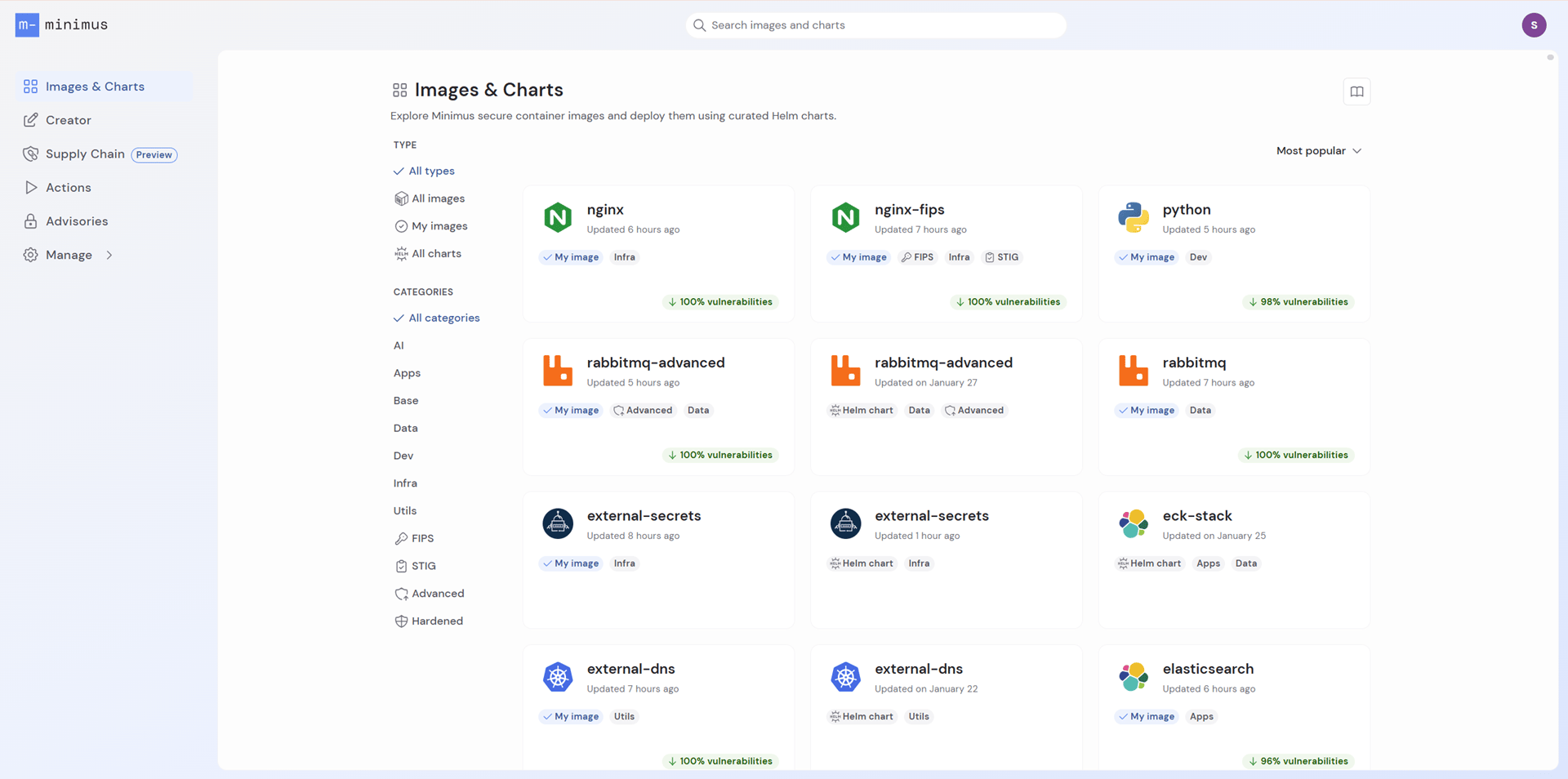
The Minimus gallery lists all the images and Helm charts available from Minimus. Minimus offers a wide range of images for popular open-source projects, services, and applications and Helm charts to automate their deployment.
 ## At a glance
The gallery provides a summary of key details:
* Last updated - shows when the `latest` (and/or `latest-dev`) image version or the most recent Helm chart version was last updated.
* Vulnerability reduction for images - shows the overall risk reduction relative to the public image calculated in percentages.
## Pulling an image
The gallery is the visual interface for the Minimus container registry located at: `reg.mini.dev`. You can pull any image using any tag, digest, or unique-timestamp tag. This includes FIPS validated images and CIS Hardened images.
## Sort the gallery
Toggle the view by:
* Most popular (default view)
* Name (leading with your [private images](/enterprise-edition/image-creator))
* Recently added (shows when each image and chart was first added to the Minimus gallery)
## Search the gallery
Search the Minimus gallery by names and related terms. For example, if you search for `gitops` you will see related images and Helm charts.
## At a glance
The gallery provides a summary of key details:
* Last updated - shows when the `latest` (and/or `latest-dev`) image version or the most recent Helm chart version was last updated.
* Vulnerability reduction for images - shows the overall risk reduction relative to the public image calculated in percentages.
## Pulling an image
The gallery is the visual interface for the Minimus container registry located at: `reg.mini.dev`. You can pull any image using any tag, digest, or unique-timestamp tag. This includes FIPS validated images and CIS Hardened images.
## Sort the gallery
Toggle the view by:
* Most popular (default view)
* Name (leading with your [private images](/enterprise-edition/image-creator))
* Recently added (shows when each image and chart was first added to the Minimus gallery)
## Search the gallery
Search the Minimus gallery by names and related terms. For example, if you search for `gitops` you will see related images and Helm charts.
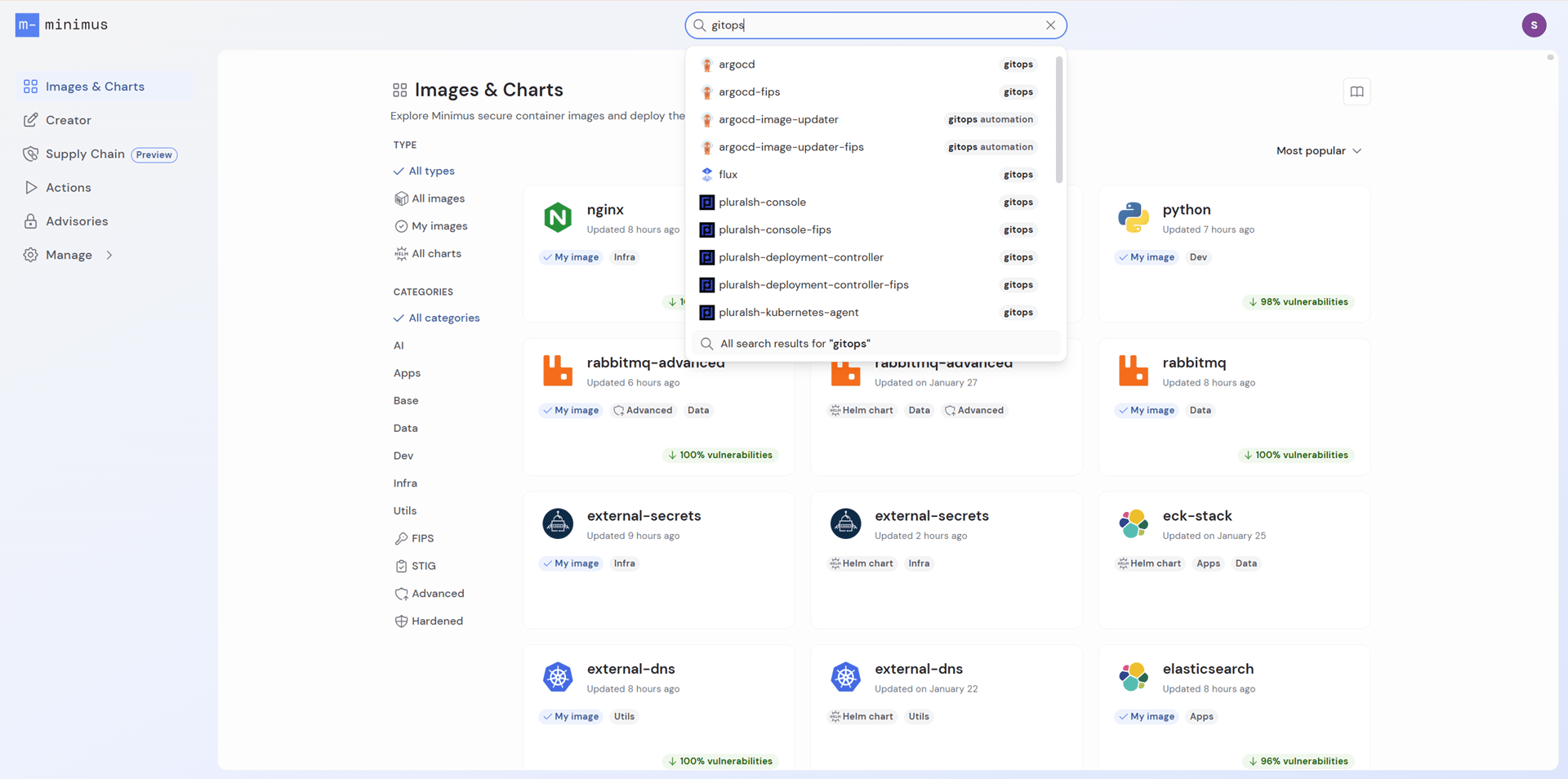 Enter a search term and press **Enter** to return all results, including related images and charts. Note that the search corrects for typos and similar spelling so you may see more than just exact matches.
## Filter the gallery
Quick filters help you find the images and charts you are looking for. Use the filter **My Images** to see your subscribed images.
You can filter by categories:
* AI
* Apps
* Base
* Data (as in databases)
* Dev
* Infra (as in infrastructure)
* Utils (as in utilities)
You can also filter by compliance standards:
* FIPS - FIPS 140-3 validated images are CMVP certified and comply with the relevant Federal Information Processing Standards for cryptography. [Learn more](/compliance/fips)
* STIG - STIG compliant images follow the technical testing and hardening frameworks required by the DoD and the Defense Information Systems Agency (DISA) under STIGs, [Security Technical Implementation Guides](https://public.cyber.mil/stigs/).
* Advanced - Advanced images are compatible with Bitnami Helm charts. [Learn more](/foundations/image-types)
* Hardened - Images hardened to meet CIS app benchmarks. [Learn more](/foundations/image-types)
## Request an image
The Minimus image gallery is growing fast as new images are added on a rolling basis.
As we continue working to expand our offering, we also gladly accept requests. Please use the link from the gallery to contact us with your request.
Enter a search term and press **Enter** to return all results, including related images and charts. Note that the search corrects for typos and similar spelling so you may see more than just exact matches.
## Filter the gallery
Quick filters help you find the images and charts you are looking for. Use the filter **My Images** to see your subscribed images.
You can filter by categories:
* AI
* Apps
* Base
* Data (as in databases)
* Dev
* Infra (as in infrastructure)
* Utils (as in utilities)
You can also filter by compliance standards:
* FIPS - FIPS 140-3 validated images are CMVP certified and comply with the relevant Federal Information Processing Standards for cryptography. [Learn more](/compliance/fips)
* STIG - STIG compliant images follow the technical testing and hardening frameworks required by the DoD and the Defense Information Systems Agency (DISA) under STIGs, [Security Technical Implementation Guides](https://public.cyber.mil/stigs/).
* Advanced - Advanced images are compatible with Bitnami Helm charts. [Learn more](/foundations/image-types)
* Hardened - Images hardened to meet CIS app benchmarks. [Learn more](/foundations/image-types)
## Request an image
The Minimus image gallery is growing fast as new images are added on a rolling basis.
As we continue working to expand our offering, we also gladly accept requests. Please use the link from the gallery to contact us with your request.