> ## Documentation Index
> Fetch the complete documentation index at: https://docs.minimus.io/llms.txt
> Use this file to discover all available pages before exploring further.
# Managing Tokens
> Manage your tokens to authenticate to the Minimus Registry and pull Minimus images and/or packages
An active token is required to pull and verify images from the Minimus registry. Visit the [tokens page](https://images.minimus.io/manage/tokens) in the Minimus console to manage your Minimus tokens.
You have extensive control over your account's tokens to:
* Create and revoke registry tokens as needed, up to a maximum of 100 tokens
* Set token expiration
* Set token scope
## Token scope
A Minimus token can unlock access to several Minimus services, depending on your needs:
* **Image access** (default) - Pull Minimus secure images from the Minimus registry with Enterprise Edition commitments.
* **Package access** - Install packages built by MinimOS in Minimus images for a comprehensive build experience. [Learn more](/basics/package-manager-access)
* **minicli access** - Use the Minimus CLI to embed Minimus in your CI/CD processes. Currently minicli is used to manage Minimus Creator and private images with more capabilities to follow. [Learn more](/basics/package-manager-access)
### Restricting minicli access
Tokens with minicli scope are hidden from Viewers by default, giving admins control over who can connect via minicli. To restrict access, create a dedicated token with minicli scope — it will only be visible to admins and editors.
The default token is an exception: it remains visible to all users, including Viewers.
 ## Managing tokens
### Default token
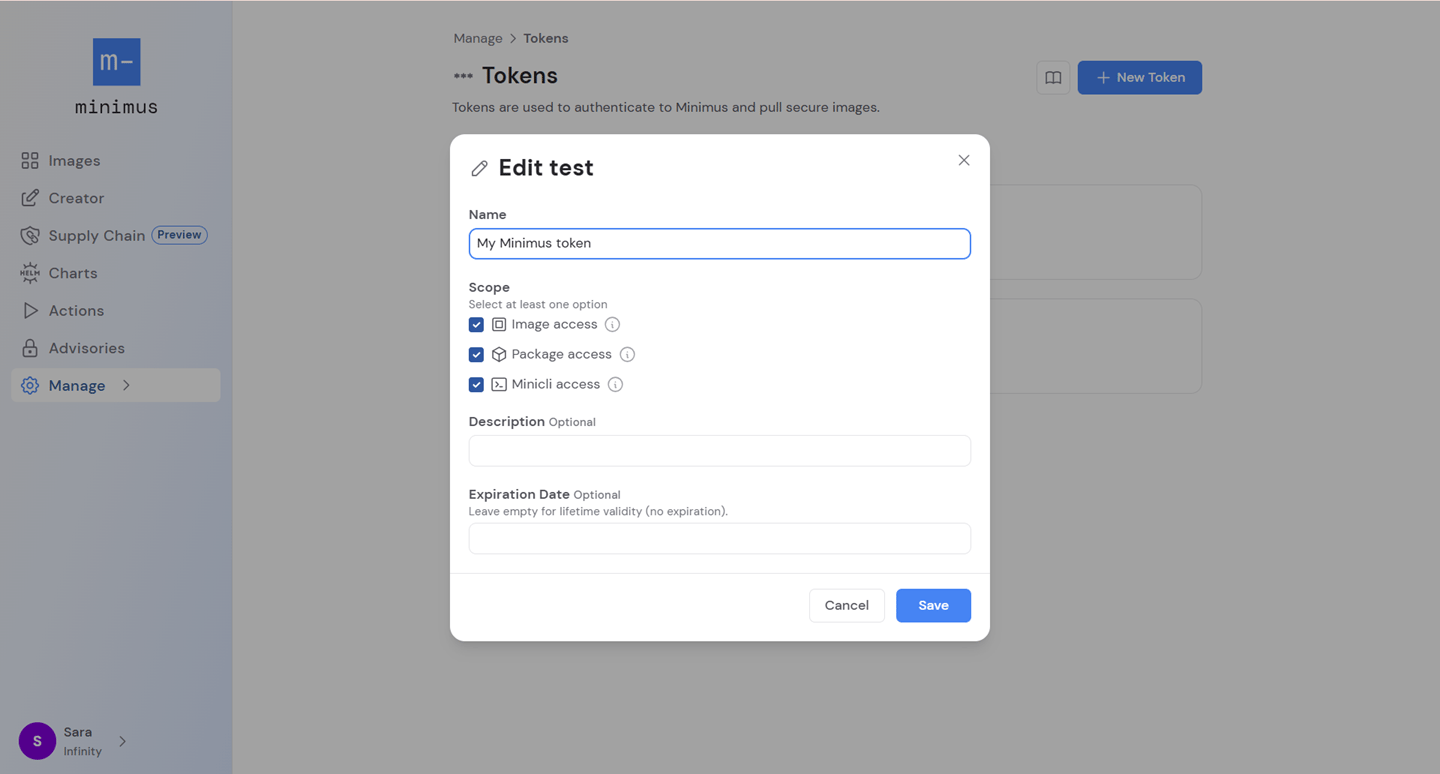
A default token is automatically generated when you sign up for Minimus. You can edit its expiration date, name it, and add a description.
### Creating a token
When creating a token:
1. Provide its name and description to help you keep track of its purpose. The description is optional.
2. Set the token scope: image access, package access, minicli access.
3. Set the expiration date using the calendar date picker. Leave empty for no expiration (lifetime validity).
### Editing a token
All fields can be edited for an existing token.
### Token expiration
Control your token expiration dates or set your tokens to never expire - the choice is fully yours. A calendar date picker makes the configuration simple and quick.
* If an expiration date is not selected, the token will not expire. In other words, it will remain active for the duration of your membership.
* You can extend the lifetime of an already expired token to reactivate it.
## Token list
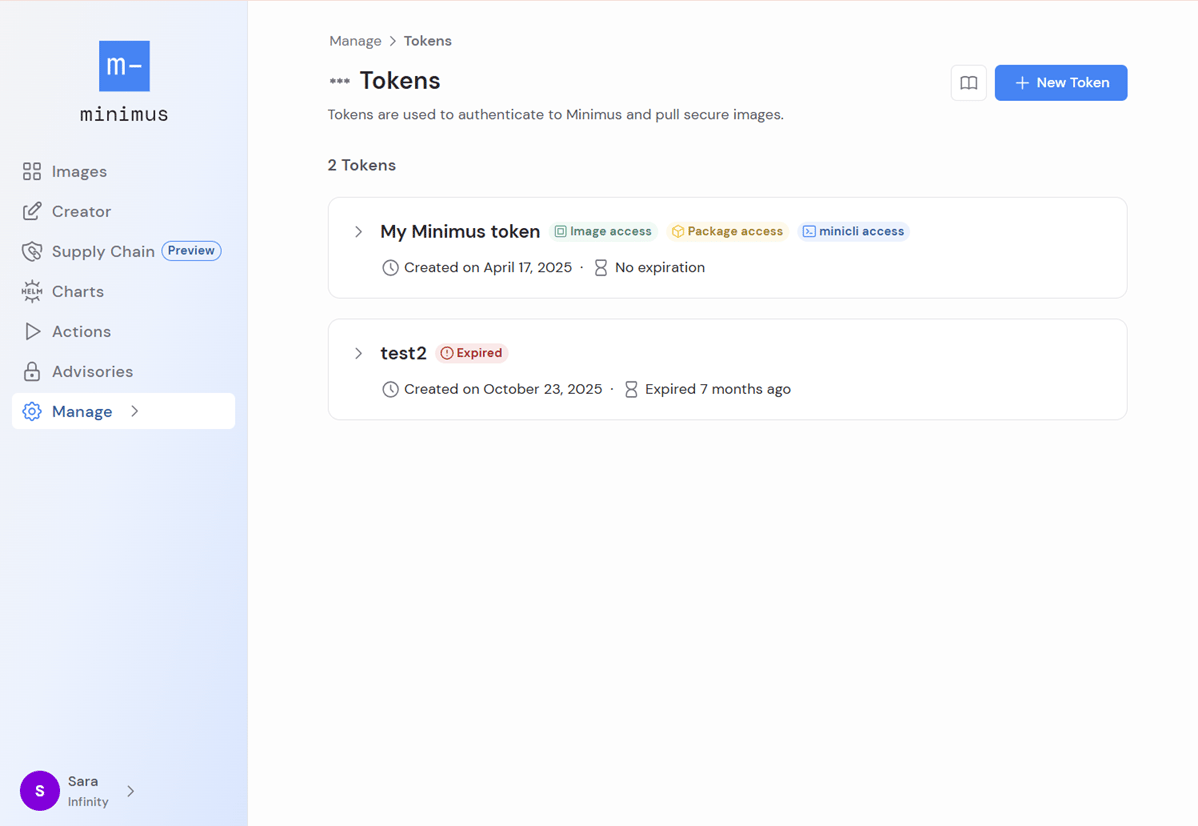
Your tokens are listed in collapsed cards.
* In collapsed mode, the token card shows the token name, description, and creation and expiration dates. Token scope is indicated by the colorful badges.\\
## Managing tokens
### Default token
A default token is automatically generated when you sign up for Minimus. You can edit its expiration date, name it, and add a description.
### Creating a token
When creating a token:
1. Provide its name and description to help you keep track of its purpose. The description is optional.
2. Set the token scope: image access, package access, minicli access.
3. Set the expiration date using the calendar date picker. Leave empty for no expiration (lifetime validity).
### Editing a token
All fields can be edited for an existing token.
### Token expiration
Control your token expiration dates or set your tokens to never expire - the choice is fully yours. A calendar date picker makes the configuration simple and quick.
* If an expiration date is not selected, the token will not expire. In other words, it will remain active for the duration of your membership.
* You can extend the lifetime of an already expired token to reactivate it.
## Token list
Your tokens are listed in collapsed cards.
* In collapsed mode, the token card shows the token name, description, and creation and expiration dates. Token scope is indicated by the colorful badges.\\
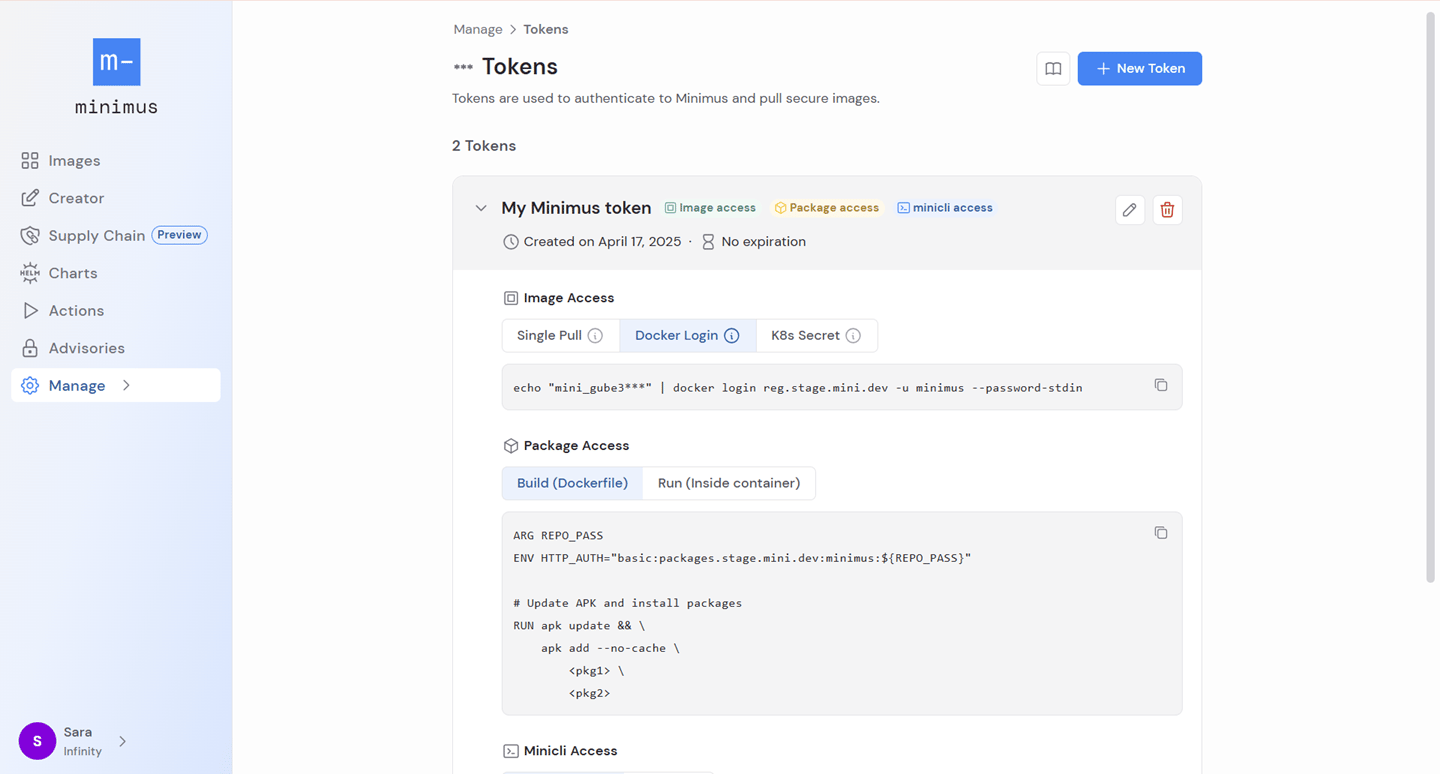
 * Expand the token card to view the token itself and useful authentication commands for different common use-cases.\\
 ## Authenticating with your token
Expand your token card to view the token and copy the provided authentication commands:
* Docker login
* Create K8s secret
* Package access
* minicli login
[Learn more about Minimus authentication](/enterprise-edition/authentication)
## Authenticating with your token
Expand your token card to view the token and copy the provided authentication commands:
* Docker login
* Create K8s secret
* Package access
* minicli login
[Learn more about Minimus authentication](/enterprise-edition/authentication)