> ## Documentation Index
> Fetch the complete documentation index at: https://docs.minimus.io/llms.txt
> Use this file to discover all available pages before exploring further.
# Security Advisories
> Keeping up with vulnerability reports for your Minimus images
Minimus publishes security advisories for vulnerabilities affecting Minimus images and their dependencies. The information complements the vulnerability report provided for every image version.
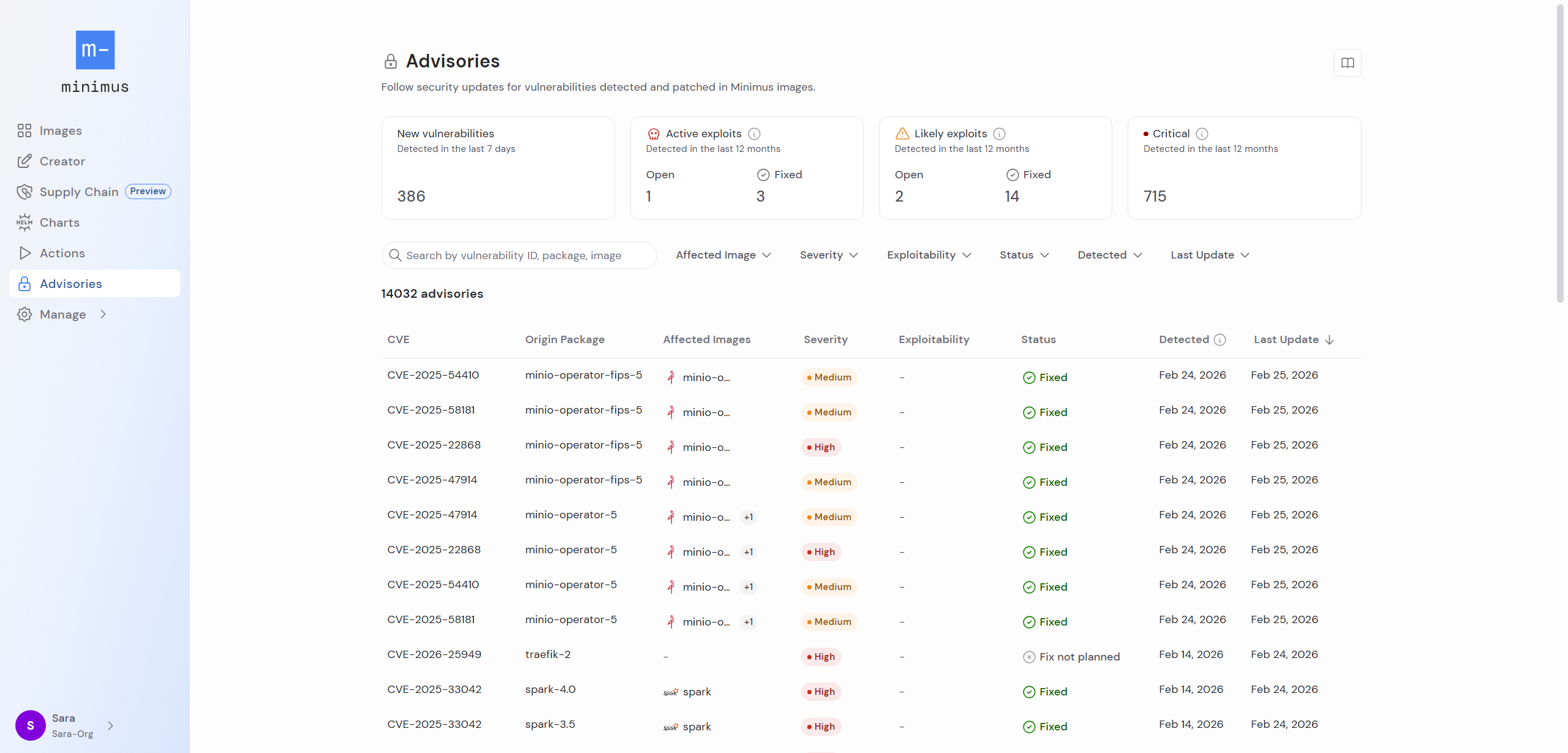
Select **Advisories** from the left menu to visit the list of advisories published for Minimus images (or use the [direct link](https://images.minimus.io/advisories)).
 Affected images only refer to production images. Development image variants (for example, an image tagged `latest-dev`) are excluded by default.
Refer to version-specific vulnerability reports for information about vulnerabilities affecting development images. [Learn more](/foundations/image-card#versions)
## Overview
Before you dive into the details, examine the metrics in the top section:
* Total number of new vulnerabilities detected in the past 7 days in Minimus packages
* Total number of vulnerabilities detected over the past year in Minimus packages that are currently known as **active exploits** (i.e. they are on the CISA KEV list)
* Total number of vulnerabilities detected over the past year in Minimus images that are currently labeled as **likely exploits** (i.e. they have a high EPSS probability score and are likely targets for exploitation).
* Total number of critical severity vulnerabilities detected over the past year in Minimus images.
## Advisories table
The advisories table lists all affected packages. Some vulnerabilities affect multiple packages, so you will notice the same vulnerability listed on a separate line for each impacted package. When the affected package is mapped to a Minimus image, the image information and fixed version will appear as well.
The advisories table shows the following:
* Vulnerability ID - either a CVE ID or a GHSA (GitHub Security Advisory) ID
* Origin package affected by the vulnerability. Note that affected secondary packages are detailed in the vulnerability report for specific image versions.
* Affected images (Only showing production images. Dev images are excluded.)
* Severity (CVSS score listed by NVD from registered CNAs, CISA ADP, or NIST. Where there are multiple severity analyses with different scores, Minimus favors the most recent CVSS vector and the most reputable vendor). [Learn more about competing CVSS severity scores](/remediate/priorities/cvss)
* Exploitability, as determined by Minimus [based on CISA KEV or EPSS predictions](/remediate/threat-intel#exploitability-label).
* Status
* Date published ([Note that an image may be fixed before the advisory was published](/remediate/fix-date).)
* First detection
* Last updated ([Note the difference between package fix date, image build date, and the advisory fix notification](/remediate/fix-date)).
### Filtering, searching, and sorting advisories
1. **Filtering options**
You can filter the advisories list by affected images, severity, exploitability, status, detection date and last update. The filters are friendly UI elements, and do not require complex syntax.
The **Affected Images** filter has the following options:
1. My images (Default)
2. Any
3. Specific images (Searchable list of images)
4. Remove this filter to include also advisories for packages that are not mapped to any image.
2. **Search options**
You can search the advisories by a full or partial vulnerability ID and/or a package and image name. You can combine search terms with filtering criteria.
3. **Sorting options**
You may sort the advisories by their severity and last update.
## Drill down on an advisory
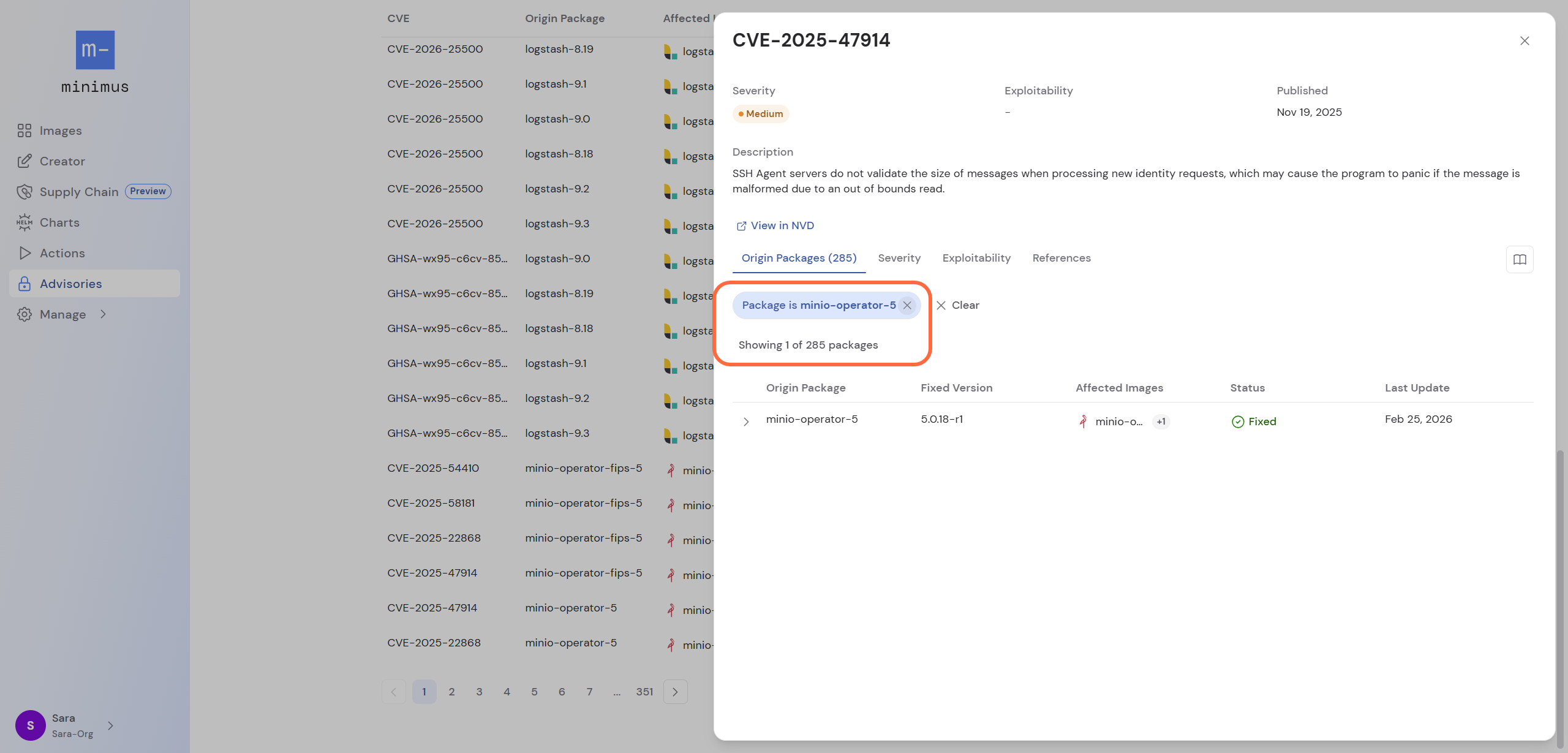
Click on an advisory in the table to view its detailed listing. When drilling down from the advisories table, a filter is applied by default for the specific origin package.
Affected images only refer to production images. Development image variants (for example, an image tagged `latest-dev`) are excluded by default.
Refer to version-specific vulnerability reports for information about vulnerabilities affecting development images. [Learn more](/foundations/image-card#versions)
## Overview
Before you dive into the details, examine the metrics in the top section:
* Total number of new vulnerabilities detected in the past 7 days in Minimus packages
* Total number of vulnerabilities detected over the past year in Minimus packages that are currently known as **active exploits** (i.e. they are on the CISA KEV list)
* Total number of vulnerabilities detected over the past year in Minimus images that are currently labeled as **likely exploits** (i.e. they have a high EPSS probability score and are likely targets for exploitation).
* Total number of critical severity vulnerabilities detected over the past year in Minimus images.
## Advisories table
The advisories table lists all affected packages. Some vulnerabilities affect multiple packages, so you will notice the same vulnerability listed on a separate line for each impacted package. When the affected package is mapped to a Minimus image, the image information and fixed version will appear as well.
The advisories table shows the following:
* Vulnerability ID - either a CVE ID or a GHSA (GitHub Security Advisory) ID
* Origin package affected by the vulnerability. Note that affected secondary packages are detailed in the vulnerability report for specific image versions.
* Affected images (Only showing production images. Dev images are excluded.)
* Severity (CVSS score listed by NVD from registered CNAs, CISA ADP, or NIST. Where there are multiple severity analyses with different scores, Minimus favors the most recent CVSS vector and the most reputable vendor). [Learn more about competing CVSS severity scores](/remediate/priorities/cvss)
* Exploitability, as determined by Minimus [based on CISA KEV or EPSS predictions](/remediate/threat-intel#exploitability-label).
* Status
* Date published ([Note that an image may be fixed before the advisory was published](/remediate/fix-date).)
* First detection
* Last updated ([Note the difference between package fix date, image build date, and the advisory fix notification](/remediate/fix-date)).
### Filtering, searching, and sorting advisories
1. **Filtering options**
You can filter the advisories list by affected images, severity, exploitability, status, detection date and last update. The filters are friendly UI elements, and do not require complex syntax.
The **Affected Images** filter has the following options:
1. My images (Default)
2. Any
3. Specific images (Searchable list of images)
4. Remove this filter to include also advisories for packages that are not mapped to any image.
2. **Search options**
You can search the advisories by a full or partial vulnerability ID and/or a package and image name. You can combine search terms with filtering criteria.
3. **Sorting options**
You may sort the advisories by their severity and last update.
## Drill down on an advisory
Click on an advisory in the table to view its detailed listing. When drilling down from the advisories table, a filter is applied by default for the specific origin package.
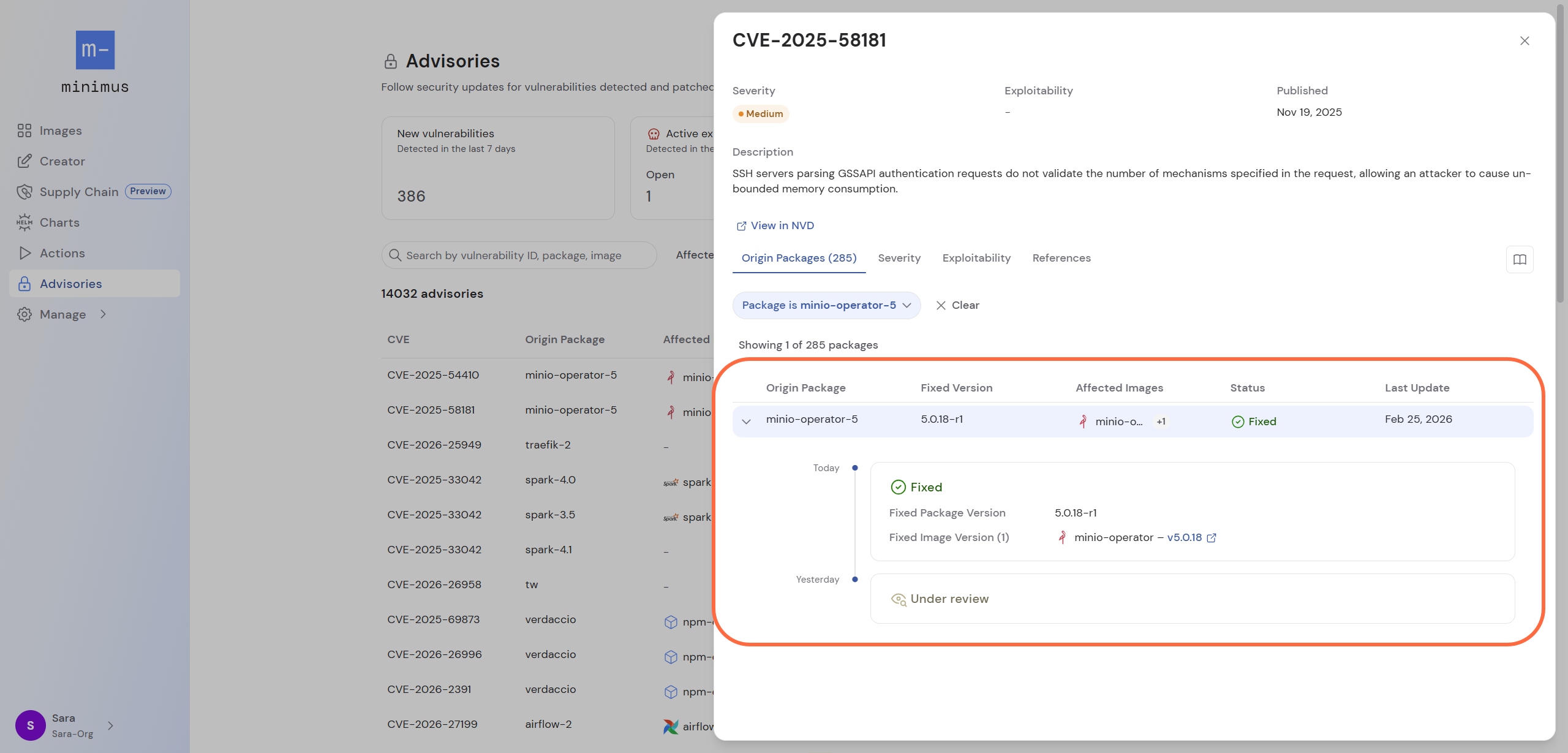
 Expand the card to view the full advisory details with detailed information listing all affected images, the current status, fixed package and image version information (if available), and the status history. [Learn more](/remediate/cve-advisory)
 ## Advisory status
| Status | Description |
| -------------------- | ---------------------------------------------------------------------------------------------------------------------------------------- |
| Under review | Minimus is following up on the vulnerability report to confirm the report and determine if the vulnerable code affects the package. |
| Affected | The vulnerability was confirmed by the Minimus team to be affecting the package. |
| Unaffected | The vulnerability was determined to be a false-positive by Minimus. Reasoning is provided in a note. |
| Pending upstream fix | Minimus is waiting for the source repo to publish a fix for the package. The image will be patched as soon as the fix becomes available. |
| Fixed | A patch was applied to remediate the vulnerability. |
| Fix not planned | Usually a fix is not planned for package versions that have reached their end of life (EOL). Reasoning is provided in a note. |
## Advisory status
| Status | Description |
| -------------------- | ---------------------------------------------------------------------------------------------------------------------------------------- |
| Under review | Minimus is following up on the vulnerability report to confirm the report and determine if the vulnerable code affects the package. |
| Affected | The vulnerability was confirmed by the Minimus team to be affecting the package. |
| Unaffected | The vulnerability was determined to be a false-positive by Minimus. Reasoning is provided in a note. |
| Pending upstream fix | Minimus is waiting for the source repo to publish a fix for the package. The image will be patched as soon as the fix becomes available. |
| Fixed | A patch was applied to remediate the vulnerability. |
| Fix not planned | Usually a fix is not planned for package versions that have reached their end of life (EOL). Reasoning is provided in a note. |