

- Images - Refers to the image type, as in Nginx, Python, Go, PHP, Redis, etc.
- Image lines - Refers to the release branch. Minimus image lines match the upstream’s maintained release lines.
- Versions - Refers to the exact version number or release number. Image versions are placed under the appropriate image line (aka, release branch).
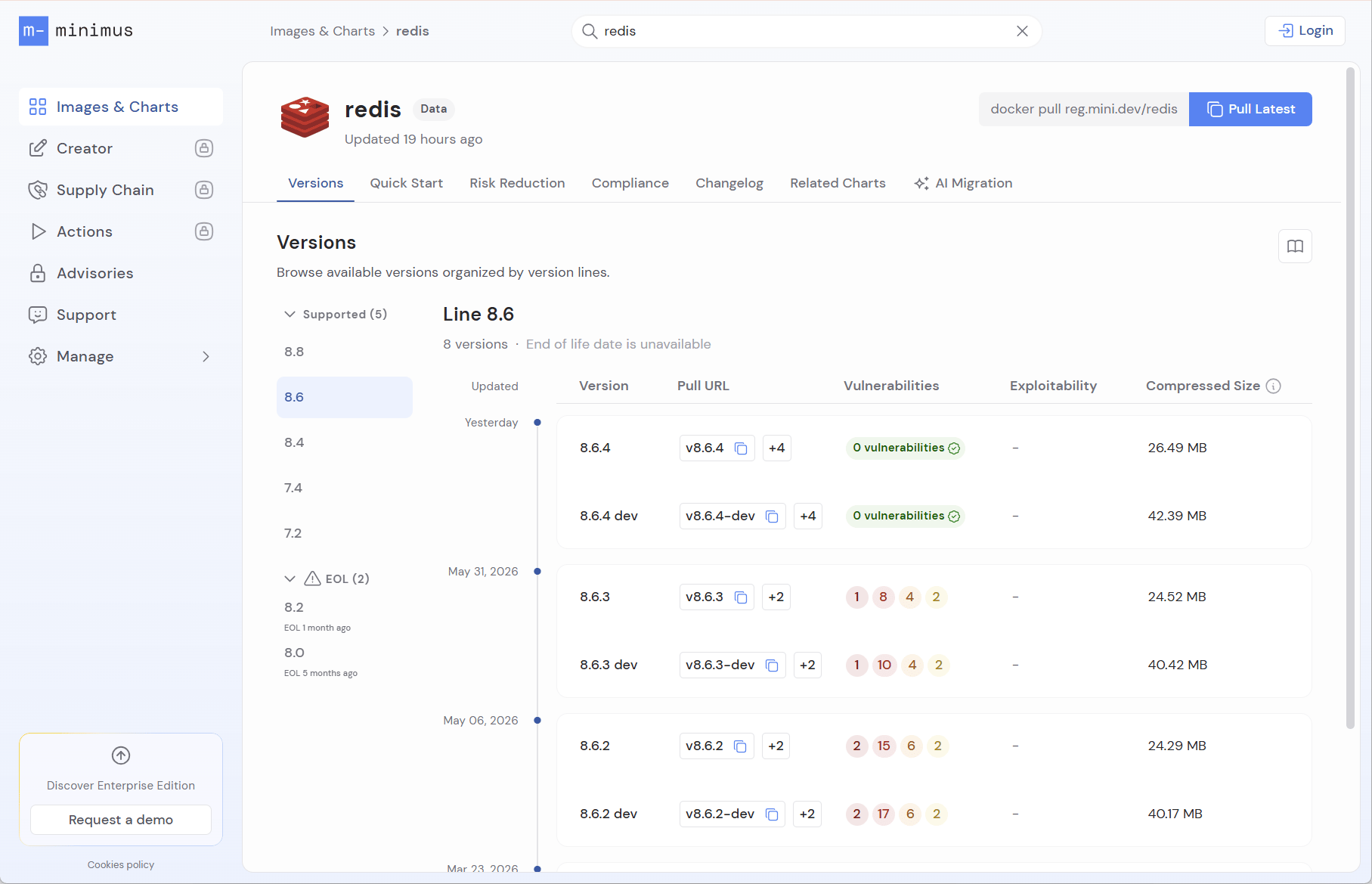
Example of Minimus image display, by image line and version
About image lines
Minimus maintains release branches that are being actively supported by their upstream projects. Most projects maintain at least 2 image lines, but some maintain many more. For example, Postgres maintains 5 release lines (ref). Some projects use name tags in addition to the version number, for example nginx hasmainline and stable image lines (ref).
Support dates:
- Images that are officially considered LTS (long term support) by the upstream project are marked as such.
- Image lines that have reached end-of-life (EOL) or are near-EOL are shown at the bottom of the list in a separate category.
About image versions
Minimus follows the release schedule of the upstream projects. In other words, every time a new version is released by the upstream project, Minimus builds an image of the new version. The version numbers are identical to the upstream project and are shown in the relevant image line. Learn more about the Minimus new version SLA The image version typically follows semantic versioning conventions in X.Y.Z format (ref). For example, an nginx image is taggedmainline and version 1.29.5 (on March 9, 2026).
Daily image builds
Thelatest tag may appear static but it is continuously being updated by Minimus to incorporate package updates as they are made available. This is true not only for latest, but also for the most recent version in every image line.
While the image version didn’t change, new digests indicate that the image was rebuilt with updated packages. The updates are listed in the image changelog and digest history. Every image build receives a new digest and a new unique timestamp tag. Learn more
Digest retention policy
Minimus images are continuously being maintained and rebuilt with the freshest packages and updates. As a result, an image version may have numerous digests corresponding to the number of times the image was built by Minimus. As a user, you should always use the last available digest for your version of choice. For transparency, the Minimus image gallery displays a complete history of all previous builds, even after they have been removed from the registry.Retention schedule for historical digests
Older image digests remain available to pull from the registry for a limited time:- Production images: Retained for 180 days
- Dev images: Retained for 30 days
The most recent build for every minor version is always retained. This retention policy only removes older, redundant builds for versions that have multiple digests.
LTS and EOL labels
Minimus aims to provide accurate and complete information about support timelines and expected end of life dates for image lines.Long term support (LTS)
Official long term support image lines are indicated in the Minimus console along with the set end-of-life date (if available).End of life (EOL)
Scheduled end-of-life dates are provided, where available. This can save you the trouble of having to look them up in the upstream project. Learn more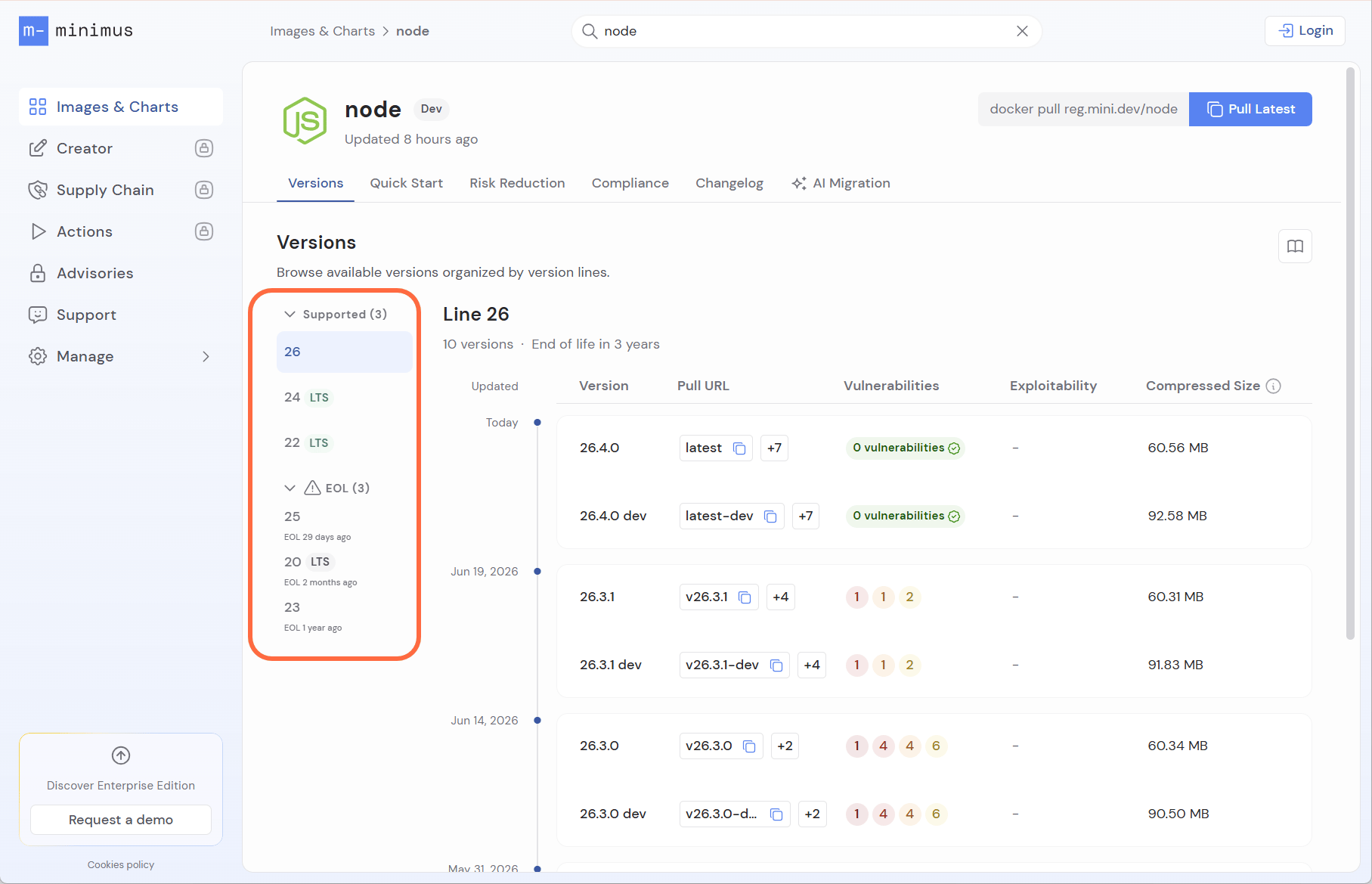
Node image lines marked as LTS, EOL, and near EOL
Active support vs. security support
Many open source projects offer two or more support phases. For example, Python and Node offer active support followed by security support (Python ref, Node ref). MySQL offers premier support followed by extended support (ref). In Minimus, end of life is indicated when the image line no longer receives any kind of support or updates upstream. See Image CardWhen EOL date is unknown
Some upstream projects do not provide EOL dates at all. Other projects only announce the EOL date for the latest image line only after the subsequent release is out. In such cases Minimus will mark the EOL as unavailable.You can reference the popular site https://endoflife.date/ to quickly look up information about support schedules for most projects.
Selecting the right image line
If you’re not already committed to a particular image version, you may be asking yourself which image line you should use? Minimus can help you decide based on your requirements:- As a general recommendation, unless you have constraints such as app compatibility issues, you should always use the latest version. This ensures that you are using the most up-to-date version and can benefit from security updates more completely.
- If your testing cycle is relatively longer, you may be forced to use a previous version line. You should still opt for the most recent version within the line to benefit from daily security updates.
- If you have constraints that require you to use an older image version, note that the version will not receive security updates. Minimus images are minimal and hardened from the start and so accumulate vulnerabilities more slowly, thereby staying more secure for a relatively longer period of time.
- Visit the Minimus gallery to view a current vulnerability report for any image version. The report provides an up-to-date status on the vulnerabilities detected in the version. Learn more about image vulnerability reports
Multi-architecture images
Minimus images are built to support multiple CPU architectures (amd64 and arm64) and can run on different hardware platforms without requiring separate images. When you run thedocker pull command to get an image from the Minimus gallery, it will automatically pull the correct architecture for your system.
You can toggle between the amd64 and arm64 image to view the relevant SBOM and SBOM signature. See for example the Redis arm64 SBOM and SBOM signature.