

image:tag@sha256:{digestValue}. For example, python:3.14.4@sha256:98706f040021993a82d2f70451a73698315370ae8615cc468ac0f213dbd46624
As a security expert, it is important to understand the differences between the image tags and image digest and know when each of them are recommended.
Image version tag
Image version tags describe the software version. For example, the Python image version 3.14.4 contains the package for Python v3.14.4 with other required packages. Similarly, the Postgres image version 18.3 contains the package for Postgres v18.3 with other required packages and so forth. Image version tags help you determine what software you are currently running and whether you should pull a new version when it becomes available. Note that image tags are mutable, meaning that the same tag can point to a different image build at different times. That is, an image can be built several times yet always assigned the same tag. In that sense, the image version tag does not guarantee that the code hasn’t changed.Major and minor version tags
Minimus organizes each image by image lines and versions within each line. The latest version will often carry several tags, as shown below.
In the above example, the tags
python:3, python:3.14, and python:3.14.4 all resolve to the exact same image. However, as new versions are released, these tags behave differently:
3.14.4is locked permanently to this exact version.3.14automatically updates to future patches (e.g.,3.14.5), but stops before3.15.0.3automatically updates to all future minor and patch releases within Python 3, but will not point to Python 4.
Image digest
An image digest is the SHA-256 hash of the image manifest - a JSON document detailing the configuration objects, file system layers, and other optional metadata of an image build. The digest is automatically generated at build time and is unique to every build. If you build the exact same image twice, each build will produce a different digest. With the image digest, you enjoy the certainty that it will always point to the same exact image in the registry. In other words, the image digest is immutable. The image digest is the most reliable identifier of any image. Unlike image tags, the digest is fixed and always points to the same exact image, guaranteed. On the flip side, the image digest can be cumbersome to work with. Pulling an image by digest isn’t practical or common but it is important to scan by image digest.Look up the digest
In the Minimus console, all the digests created for a specific version are listed in the Changelog and the Digest History tabs. To look up an image digest in your CLI, run:Look up by digest
In the Minimus console, you can search the Changelog by digest (or a fragment of the digest). The result will be returned with the relevant change information and a direct link to compare the available digests for the version.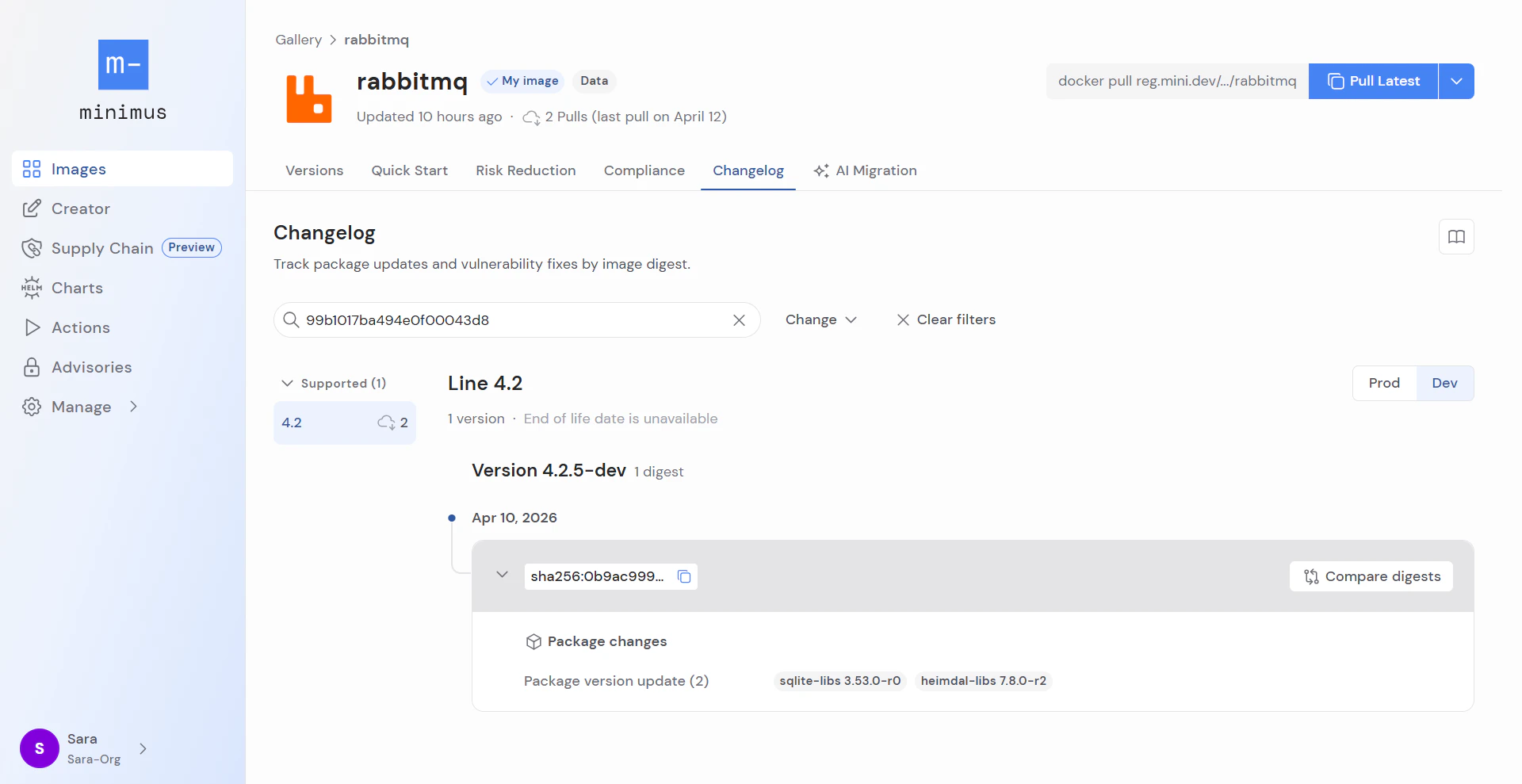
Comparing digests to tags
The image digest is immutable, meaning that it does not change over time and will always point to the same image build. If you know the image digest, you have a way to identify a particular image with certainty. The exact image identified by the digest is fixed and does not change over time. When it comes to security scans and SBOM attestations, it is important to rely on the image digest. In contrast, the image tag describes the software version. Whenever an update is released under the same image tag, the tag starts pointing to the newest build, but without a clear indication that the build has changed. Hence, the image tag does not necessarily provide a clear indication of changes and can be misleading. Image tags are useful when the focus is on the software version when pulling and building, but are not recommended for scanning. Minimus offers a hybrid option known as the unique timestamp tag. The unique timestamp tag is assigned during image build time, and it is immutable. Essentially the timestamp tag functions like the image digest.Considerations
Pulling images requires balancing compatibility and stability concerns with the ability to automate updates as much as possible. There is a wide array of approaches:- Pulling the most up-to-date version by the
latesttag prioritizes security over stability. It is a common approach in development and testing environments, but certainly has its drawbacks when it comes to production environments. - Pulling by the image version (e.g.
reg.mini.dev/nginx:1.27) using the version line tag offers a balanced approach. It offers some compatibility control without requiring the team to update deployment artifacts for every image update. - Pulling by digest is the most conservative approach. It guarantees reproducibility but comes at the cost of convenience. This approach requires weekly if not daily updates, following every image security update.